
Better Blog Formatting. Better Presentation. Better Search Results. Get Started
Facebook LinkedIn WhatsApp YouTube
Post Uploader
  • Home
  • About
    • About Us
    • Leadership Team
    • Awards & Recognition
    • Request Consultation
    • Help & FAQs
    • Careers
    • Contact Us
  • Pricing Plans
  • Services

    Services

    • Blog Formatting & Publishing
    • eCommerce Product Listing
    • Website Content Population
    • AI Workflow Automation
    • Starter Website Package
    • Virtual Assistant Support

    Industries

    • Banking & Finance
    • Sciences & Healthcare
    • Technology & Software
    • Education & Training
    • Hospitality & Leisure
    • Power & Utilities
  • Case Studies
  • Blog
Get in Touch Get in Touch
  • Home
  • Blog
  • Blog Post Formatting Guides
  • Affiliate X Plugin: The Ultimate Guide to Creating Product Tables in WordPress
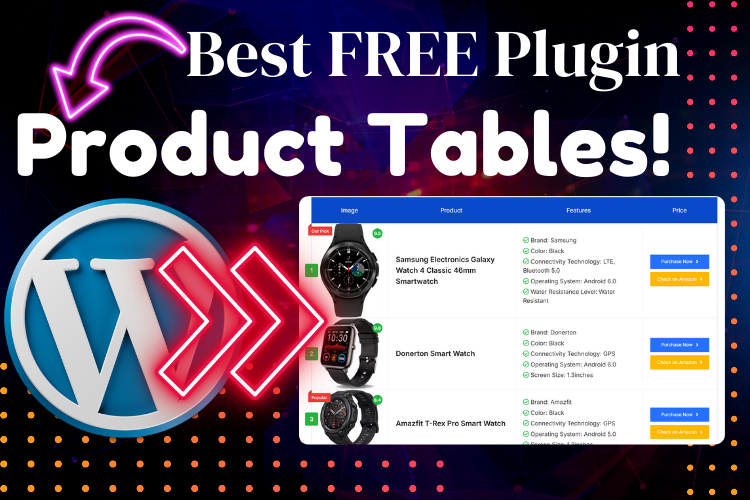
Create Product Table in WordPress with Affiliate X Plugin
Affiliate X PluginBlogging ToolsFree WordPress PluginProduct TableWordPress Plugin
PostUploader.com
March 4, 2025
Blog Post Formatting Guides
0 Comments:

Affiliate X Plugin: The Ultimate Guide to Creating Product Tables in WordPress

If you’re looking to enhance your WordPress blog with sleek, customizable product tables, the Affiliate X Plugin is a game-changer. This free tool allows bloggers, especially those focused on affiliate marketing, to create visually appealing product tables without needing advanced design skills.

For a detailed visual walkthrough, watch the YouTube video below to see the plugin in action!

  • What is the Affiliate X Plugin?
  • Why Use a Product Table on Your Blog?
  • Step-by-Step Guide to Creating a Product Table Using Affiliate X Plugin
    • Install and Activate the Plugin
    • Adding a Product Table to Your Blog Post
    • Customize Your Product Table
  • Pro Tips for Using the Affiliate X Plugin Effectively
  • Best Practices for SEO with Product Tables
  • Frequently Asked Questions (FAQs)
  • Conclusion: Boost Your Blog's Performance with Affiliate X Plugin

What is the Affiliate X Plugin?

The Affiliate X Plugin is a robust tool designed for WordPress users who want to add product tables to their posts or pages. It offers a range of features, including multiple layout options, customizable buttons, and dynamic product showcases. Best of all, it’s completely free!

Why Use a Product Table on Your Blog?

Product tables are not just a design feature—they are a strategic tool for boosting conversions.

When showcasing products, a well-structured product table can:

  • Enhance User Experience: Easy comparison of product features.
  • Boost SEO: Structured data improves search visibility.
  • Increase Affiliate Revenue: Encourages clicks on purchase links.

Step-by-Step Guide to Creating a Product Table Using Affiliate X Plugin

Install and Activate the Plugin

  1. Navigate to the Plugin Section: In your WordPress dashboard, go to Plugins > Add New.
  2. Search for Affiliate X Plugin: Type Affiliate X in the search bar.
  3. Install and Activate: Once found, click Install Now and then Activate.

Adding a Product Table to Your Blog Post

  1. Go to Your Post Editor: Open the post where you want to add the product table.
  2. Insert a Product Table Block: Click the Add Block button (+) and search for Product Table.
  3. Select the Affiliate X Block: Choose the block provided by the Affiliate X Plugin.

Customize Your Product Table

  1. Choose a Layout: The plugin offers multiple layouts (Layout 1, Layout 2, Layout 3).
  2. Add Product Details: Upload images, add product names, features, and customize the buttons.
  3. Button Customization: Set the button text and add affiliate or purchase links.
  4. Style Settings: Adjust colors, shadows, and button styles to match your blog’s design.

Pro Tips for Using the Affiliate X Plugin Effectively

  • Utilize Layouts Creatively: Each layout has a unique style. Test which one best fits your blog’s aesthetic.
  • Use Compelling Button Text: Instead of “Buy Now,” try phrases like “See Latest Price” or “Read Reviews”.
  • Keep It Simple: Avoid cluttering the table with too many products. Focus on quality over quantity.

Best Practices for SEO with Product Tables

  1. Use Alt Text for Images: Include your focus keyword in image alt texts.
  2. Add Internal Links: Link to related posts within your blog for improved SEO.
  3. Include Descriptive Headers: Utilize H2, H3, and H4 tags effectively, as guided by Yoast SEO best practices​.

Frequently Asked Questions (FAQs)

The Affiliate X Plugin is a free WordPress tool that allows users to create customizable product tables easily.

Absolutely! It offers features like affiliate link integration and customizable purchase buttons that are perfect for boosting affiliate income.

Yes, the plugin is designed to be compatible with most WordPress themes.

Simply click the Add Row button within the product table block to include more products.

Yes, you can add custom CSS to further tailor the appearance of your product tables.

Yes, all of the features discussed in this guide are available in the free version of the plugin.

Conclusion: Boost Your Blog’s Performance with Affiliate X Plugin

The Affiliate X Plugin is an excellent tool for WordPress users looking to add a professional touch to their product presentations. By following this guide, you can create attractive, functional product tables that not only enhance the user experience but also improve your site’s SEO.

For a complete tutorial, watch the video above, and if you need any help, contact us for professional assistance.


  • Affiliate X Plugin
  • Blogging Tools
  • Free WordPress Plugin
  • Product Table
  • WordPress Plugin
Share
Prev Post Next Post

Recent Posts

Before vs. After: How Blog Post Formatting Transforms the Same Content
May 19, 2025
Blog Post Formatting Services
Weekly Blog Post Formatting Services: Save Time and Improve Quality
May 4, 2025
how to format a blog post
How to Format a Blog Post Like a Pro: The Ultimate Guide to Presenting Your Blog Beautifully
Apr 9, 2025

Tags

  • Adding Featured Images
  • Add Media and Text in WordPress
  • Add Text Over Images in WordPress
  • AffiliateX Plugin
  • Affiliate X Plugin
  • Blog Engagement
  • blog formatting
  • Blog Formatting Tips
  • Blogging Tips
  • Blog Post Formatting
  • Blog Post Optimization
  • Business
  • classic editor
  • Combine Media and Text in WordPress
  • Digital
  • Funds
  • Gutenberg editor
  • Gutenberg Editor Tips
  • Install Jetpack Plugin
  • Jetpack Features Guide
  • Kadence Block
  • Kadence Blocks
  • Leadership
  • SEO Optimization
  • Tech
  • Text Overlay in WordPress
  • WordPress Blog Optimization
  • WordPress Blog Post Formatting
  • WordPress Blog Tips
  • WordPress Content Management
  • WordPress Customization
  • WordPress Design Without Photoshop
  • WordPress Editing Tips
  • WordPress formatting
  • WordPress Image Upload
  • WordPress Media and Text Block
  • WordPress Plugin
  • WordPress Plugins
  • WordPress SEO
  • WordPress Text Formatting
  • WordPress Tips
  • WordPress Tutorial
  • WordPress tutorials
  • WordPress user roles
  • WordPress without Plugins
PostUploader.com

Post Uploader LLC

75 E 3rd St Sheridan, WY 82801, USA info@postuploader.com +1 (307) 310-2432

We accept payments via
Stripe, including Visa,
MasterCard, American
Express, Discover, and
other major credit and debit
cards.

About

  • Consumers
  • Growth
  • Corporate
  • Business

Services

  • Consumers
  • Growth
  • Corporate
  • Business

Industries

  • Consumers
  • Growth
  • Corporate
  • Business
  • Contact Us
  • Privacy Policy
  • Terms of Service & Refund Policy

©2022 - Post Uploader, All Rights Reserved.

PostUploader
Our specialist team understands the importance of maintaining a lasting relationships with clients to deliver specific investment solutions.
Contact Us

Contact Info

75 E 3rd St Sheridan, WY 82801, USA info@postuploader.com +1 (307) 310-2432
Live Chat
1
Scan the code
Message Us on WhatsApp
Hello,
Welcome to PostUploader.com
May I help with your Blog Post Formatting and Publishing?
Start a Chat
