
Better Blog Formatting. Better Presentation. Better Search Results. Get Started
Facebook LinkedIn WhatsApp YouTube
Post Uploader
  • Home
  • About
    • About Us
    • Leadership Team
    • Awards & Recognition
    • Request Consultation
    • Help & FAQs
    • Careers
    • Contact Us
  • Pricing Plans
  • Services

    Services

    • Blog Formatting & Publishing
    • eCommerce Product Listing
    • Website Content Population
    • AI Workflow Automation
    • Starter Website Package
    • Virtual Assistant Support

    Industries

    • Banking & Finance
    • Sciences & Healthcare
    • Technology & Software
    • Education & Training
    • Hospitality & Leisure
    • Power & Utilities
  • Case Studies
  • Blog
Get in Touch Get in Touch
  • Home
  • Blog
  • Blog Post Formatting Guides
  • Create Stunning Single Product Boxes with Affiliate X Plugin: A Step-by-Step Guide
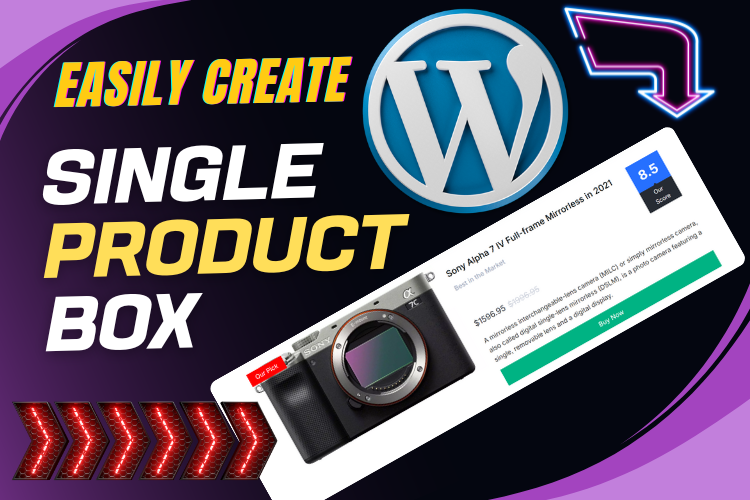
Affiliate X Plugin for Amazon Affiliate Single Product Box
Affiliate XAmazon Affiliateblog formattingProduct CustomizationSingle Product Box
PostUploader.com
March 9, 2025
Blog Post Formatting Guides
0 Comments:

Create Stunning Single Product Boxes with Affiliate X Plugin: A Step-by-Step Guide

If you’ve ever wanted to create a beautiful and fully customized single product box for your blog or Amazon affiliate site, the Affiliate X Plugin is your best friend. This versatile plugin makes it easy to add product boxes with images, titles, descriptions, ratings, and prices—all without needing advanced coding skills.

For a better visual understanding, make sure to watch this comprehensive YouTube tutorial below:

  • Why Choose the Affiliate X Plugin for Your Blog?
  • Features of Affiliate X Plugin
  • Getting Started with Affiliate X Plugin
    • Installing and Activating the Plugin
    • Creating a Single Product Box
    • Customizing Your Product Box
  • Adding Product Images and Details
  • Design Customization Tips
  • Ensuring SEO and Readability
  • Frequently Asked Questions
  • Conclusion: Start Using Affiliate X Plugin Today!

Why Choose the Affiliate X Plugin for Your Blog?

The Affiliate X Plugin is designed specifically for Amazon affiliates and bloggers who need to showcase products in a professional and appealing way. Its easy-to-use interface, combined with customizable layout options, ensures your product boxes match the overall aesthetic of your site while keeping SEO optimization in mind.

Features of Affiliate X Plugin

  • Multiple Layout Options: Choose from different layouts to find the best fit for your blog.
  • Customizable Elements: Easily edit the product title, description, images, and buttons.
  • Image Management: Upload images directly or use external URLs, including Amazon’s Site Stripe feature.
  • Advanced Design Settings: Adjust border styles, colors, and typography to make the product box unique.

Getting Started with Affiliate X Plugin

Installing and Activating the Plugin

To get started, navigate to your WordPress dashboard and go to the plugin section. Search for Affiliate X Plugin, install, and activate it.

  • Step 1: Go to Plugins > Add New
  • Step 2: Search for “Affiliate X”
  • Step 3: Install and activate the plugin

Creating a Single Product Box

Once the plugin is activated, head over to your post editor.

Follow these simple steps:

  • Click on the Add Block icon (the “+” symbol)
  • Search for Single Product
  • Select the Affiliate X Single Product Block

Customizing Your Product Box

Customization is where the Affiliate X Plugin truly shines. You can adjust the layout, add images, set titles, and change button texts.

The plugin offers three layouts:

  1. Layout One: Classic look with an image, title, and button.
  2. Layout Two: A more compact design, perfect for sidebars.
  3. Layout Three: A grid-style layout, ideal for showcasing multiple products.

Adding Product Images and Details

Adding an image is as easy as clicking the upload button. You can select an image from your media library or upload a new one. You can also paste an external image URL or directly use an Amazon product image via the Site Stripe feature.

Pro Tip: Use high-quality images and optimize them for fast loading speeds to enhance your site’s performance.

Design Customization Tips

The Affiliate X Plugin offers a robust set of design tools:

  • Border Styles: Solid, dashed, or dotted
  • Colors: Title, subtitle, content, and ribbon colors are fully customizable
  • Typography: Change fonts, sizes, and weights
  • Spacing: Adjust padding and margins to create a balanced look

Ensuring SEO and Readability

When using the Affiliate X Plugin, it’s crucial to maintain good SEO practices:

  • Use H2 and H3 Tags: Structure your content properly for better SEO.
  • Keep Text Short and Engaging: Follow the Flesch reading ease score guidelines for improved readability​.
  • Incorporate Transition Words: This helps with the flow of your content​.

Frequently Asked Questions

Simply select the External Image URL option when uploading an image, and paste your link into the provided field.

Yes, you can directly integrate images from Amazon using the Site Stripe feature, which is a huge advantage for Amazon affiliates.

Absolutely! With its intuitive block editor interface, even beginners can create professional-looking product boxes.

Double-click on the ribbon text area and enter your desired text. You can also adjust the alignment and color.

While the plugin is optimized for Amazon affiliates, you can use it to display products from any platform that supports external links.

Use relevant keywords in your product titles and descriptions, and optimize your images with alt text.

Conclusion: Start Using Affiliate X Plugin Today!

The Affiliate X Plugin is a powerful tool for creating eye-catching and informative single product boxes on your blog. Whether you’re an Amazon affiliate or simply want to enhance your product displays, this plugin offers the flexibility and functionality you need.

Don’t forget to watch the video above for a detailed walkthrough of all the features. If you have any questions or need help formatting your blog posts, feel free to contact us for support.


  • Affiliate X
  • Amazon Affiliate
  • blog formatting
  • Product Customization
  • Single Product Box
Share
Prev Post Next Post

Recent Posts

Before vs. After: How Blog Post Formatting Transforms the Same Content
May 19, 2025
Blog Post Formatting Services
Weekly Blog Post Formatting Services: Save Time and Improve Quality
May 4, 2025
how to format a blog post
How to Format a Blog Post Like a Pro: The Ultimate Guide to Presenting Your Blog Beautifully
Apr 9, 2025

Tags

  • Adding Featured Images
  • Add Media and Text in WordPress
  • Add Text Over Images in WordPress
  • AffiliateX Plugin
  • Affiliate X Plugin
  • Blog Engagement
  • blog formatting
  • Blog Formatting Tips
  • Blogging Tips
  • Blog Post Formatting
  • Blog Post Optimization
  • Business
  • classic editor
  • Combine Media and Text in WordPress
  • Digital
  • Funds
  • Gutenberg editor
  • Gutenberg Editor Tips
  • Install Jetpack Plugin
  • Jetpack Features Guide
  • Kadence Block
  • Kadence Blocks
  • Leadership
  • SEO Optimization
  • Tech
  • Text Overlay in WordPress
  • WordPress Blog Optimization
  • WordPress Blog Post Formatting
  • WordPress Blog Tips
  • WordPress Content Management
  • WordPress Customization
  • WordPress Design Without Photoshop
  • WordPress Editing Tips
  • WordPress formatting
  • WordPress Image Upload
  • WordPress Media and Text Block
  • WordPress Plugin
  • WordPress Plugins
  • WordPress SEO
  • WordPress Text Formatting
  • WordPress Tips
  • WordPress Tutorial
  • WordPress tutorials
  • WordPress user roles
  • WordPress without Plugins
PostUploader.com

Quick Contact

75 E 3rd St Sheridan, WY 82801, USA info@postuploader.com +1 (307) 310-2432

We accept payments via
Stripe, including Visa,
MasterCard, American
Express, Discover, and
other major credit and debit
cards.

About

  • Consumers
  • Growth
  • Corporate
  • Business

Services

  • Consumers
  • Growth
  • Corporate
  • Business

Industries

  • Consumers
  • Growth
  • Corporate
  • Business
  • Contact Us
  • Privacy Policy
  • Terms of Service & Refund Policy

©2022 - Post Uploader, All Rights Reserved.

PostUploader
Our specialist team understands the importance of maintaining a lasting relationships with clients to deliver specific investment solutions.
Contact Us

Contact Info

75 E 3rd St Sheridan, WY 82801, USA info@postuploader.com +1 (307) 310-2432
Live Chat
1
Scan the code
Message Us on WhatsApp
Hello,
Welcome to PostUploader.com
May I help with your Blog Post Formatting and Publishing?
Start a Chat
