
Better Blog Formatting. Better Presentation. Better Search Results. Get Started
WhatsApp LinkedIn Facebook YouTube
Post Uploader
  • Home
  • About
    • About Us
    • Leadership Team
    • Recognition & Trust
    • Request Consultation
    • Help & FAQs
    • Careers
    • Contact Us
  • Pricing Plans
  • Services

    Our Services

    • Blog Formatting & Publishing
    • eCommerce Product Listing
    • Get a Website
    • Website Content Population
    • AI Workflow Automation
    • Virtual Assistant Support

    Our Clients

    • Digital Marketing Agencies
    • Small & Growing Businesses
    • Startup Companies
    • SaaS Companies
    • Travel & Lifestyle Blogs
    • Recipe & Food Websites
  • Case Studies
  • Blog
Get in Touch Get in Touch
  • Home
  • Blog
  • Blog Post Formatting Guides
  • AffiliateX – Amazon Affiliate Plugin: The Ultimate Guide to Creating Stunning Comparison Tables in WordPress
AffiliateX Amazon Affiliate Plugin for WordPress
AffiliateX PluginAmazon Affiliate WordPress PluginBest Affiliate Plugin for WordPressProduct Comparison Table WordPressSEO-Friendly WordPress Plugins
PostUploader.com
February 2, 2025
Blog Post Formatting Guides
0 Comments:

AffiliateX – Amazon Affiliate Plugin: The Ultimate Guide to Creating Stunning Comparison Tables in WordPress

“What you focus on expands.” – The Law of Attraction

Imagine this: You’ve finally built your WordPress affiliate website, and now you’re looking for the perfect way to showcase products—a way that’s not only visually appealing but also boosts conversions effortlessly.

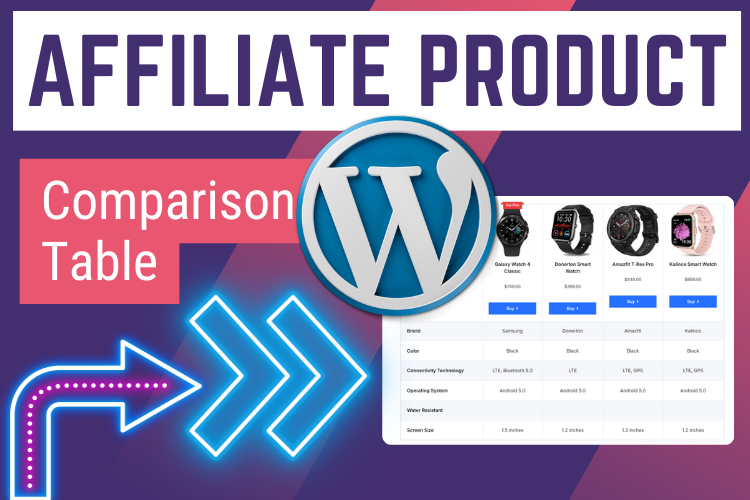
You’re in luck because today, I’m about to reveal a powerful yet simple method to create high-converting product comparison tables using the AffiliateX – Amazon Affiliate Plugin.

👉 Watch this quick video below to see it in action before we dive into the tutorial!

(For better understanding, watch the tutorial above.)

  • Why Use a Product Comparison Table?
  • Step-by-Step Guide to Creating a Comparison Table with AffiliateX
    • Step 1: Install and Activate AffiliateX Plugin
    • Step 2: Add a New Post or Edit an Existing One
    • Step 3: Insert a Product Comparison Table
    • Step 4: Customize Your Table
    • Step 5: Customize the Table Appearance
    • Step 6: Save & Preview
  • Frequently Asked Questions (FAQs)
  • Final Thoughts: Success is Already Yours!

Why Use a Product Comparison Table?

People love side-by-side comparisons before making a purchase. A well-structured comparison table can:

✔️ Help visitors quickly compare features
✔️ Boost your affiliate conversions
✔️ Improve user engagement
✔️ Enhance SEO rankings

But the problem?

Most plugins make the process complicated. That’s where AffiliateX comes in.

Let’s create an affiliate table together—step by step!

Step-by-Step Guide to Creating a Comparison Table with AffiliateX

Step 1: Install and Activate AffiliateX Plugin

1️⃣ Go to your WordPress Dashboard
2️⃣ Navigate to Plugins → Add New
3️⃣ Search for AffiliateX – Amazon Affiliate Plugin
4️⃣ Click Install → Activate

🎉 Congratulations! You’ve just unlocked a powerful affiliate tool. Now, let’s set up your first comparison table.

Step 2: Add a New Post or Edit an Existing One

Go to Posts → Add New (or select an existing post).

🛠️ Pro Tip: Your blog post should be engaging! Storytelling and authenticity always win.

Step 3: Insert a Product Comparison Table

1️⃣ Inside the Gutenberg editor, click the “+” button
2️⃣ Search for AffiliateX Product Comparison
3️⃣ Click on it, and BOOM!—your table layout appears

Step 4: Customize Your Table

This is where the magic happens! ✨

✅ Add Products – Click the “+” icon to add more columns
✅ Upload Images – Click the upload icon and select product images
✅ Enter Details – Add:

  • Product Name
  • Price
  • Ratings
  • Buy Now Button (Affiliate Link)
    ✅ Customize Buttons – Change text (e.g., “Check Price”), add a sponsored link, and set it to open in a new tab

Step 5: Customize the Table Appearance

Here’s where AffiliateX shines! You can tweak:

🎨 Colors – Adjust titles, backgrounds, and buttons
🔠 Typography – Choose fonts and sizes
🎭 Borders & Shadows – Make your table stand out
⚡ Spacing & Margins – Perfect the layout

💡 Pro Tip: Keep it clean and simple. A clutter-free design boosts conversions.

Step 6: Save & Preview

Hit Save and Preview your post to see the magic happen! 🚀

Your comparison table is now live and interactive, making your website look more professional and engaging.

“When you visualize success, success becomes your reality.” – The Law of Attraction

Your high-converting comparison table is now ready! 🎉

Frequently Asked Questions (FAQs)

Yes! The basic version is completely free, with a Pro version available for extra features.

Yes, it’s compatible with all Gutenberg-based themes.

Absolutely! You can add Amazon affiliate links and mark them as “sponsored”.

No, AffiliateX is designed for the Gutenberg editor.

Yes! Comparison tables improve engagement, which boosts Google rankings.

Final Thoughts: Success is Already Yours!

If you’ve made it this far, you’re already ahead of 90% of affiliate marketers. You now have the knowledge to create stunning comparison tables—and that’s POWERFUL. 🚀

Now, it’s time for action:

✅ Install AffiliateX
✅ Create your first table
✅ Watch your conversions grow!

💡 Want more expert tips & tutorials?
👉 Subscribe to our YouTube Channel!

💡 Need help formatting & publishing blog posts?
👉 Contact us today!

“Success is simply the law of attraction in motion—what you think, you become.”

✨ Your success starts today! Keep believing, keep taking action, and keep growing! 🚀


  • AffiliateX Plugin
  • Amazon Affiliate WordPress Plugin
  • Best Affiliate Plugin for WordPress
  • Product Comparison Table WordPress
  • SEO-Friendly WordPress Plugins
Share
Prev Post Next Post

Recent Posts

Before vs. After: How Blog Post Formatting Transforms the Same Content
May 19, 2025
Blog Post Formatting Services
Weekly Blog Post Formatting Services: Save Time and Improve Quality
May 4, 2025
how to format a blog post
How to Format a Blog Post Like a Pro: The Ultimate Guide to Presenting Your Blog Beautifully
Apr 9, 2025

Tags

  • Adding Featured Images
  • Add Media and Text in WordPress
  • Add Text Over Images in WordPress
  • AffiliateX Plugin
  • Affiliate X Plugin
  • Blog Engagement
  • blog formatting
  • Blog Formatting Tips
  • Blogging Tips
  • Blog Post Formatting
  • Blog Post Optimization
  • Business
  • classic editor
  • Combine Media and Text in WordPress
  • Digital
  • Funds
  • Gutenberg editor
  • Gutenberg Editor Tips
  • Install Jetpack Plugin
  • Jetpack Features Guide
  • Kadence Block
  • Kadence Blocks
  • Leadership
  • SEO Optimization
  • Tech
  • Text Overlay in WordPress
  • WordPress Blog Optimization
  • WordPress Blog Post Formatting
  • WordPress Blog Tips
  • WordPress Content Management
  • WordPress Customization
  • WordPress Design Without Photoshop
  • WordPress Editing Tips
  • WordPress formatting
  • WordPress Image Upload
  • WordPress Media and Text Block
  • WordPress Plugin
  • WordPress Plugins
  • WordPress SEO
  • WordPress Text Formatting
  • WordPress Tips
  • WordPress Tutorial
  • WordPress tutorials
  • WordPress user roles
  • WordPress without Plugins
PostUploader.com

Post Uploader LLC

75 E 3rd St Sheridan, WY 82801, USA info@postuploader.com +1 (307) 310-2432

Secure Payments

Payments on this website are processed securely through Stripe.

We accept major credit and debit cards, including Visa, MasterCard, American Express, and Discover.

Additional payment methods such as Google Pay, Cash App Pay, Amazon Pay, and the express checkout option “Link” may also be available depending on your device and location.

About

  • About Us
  • Recognition & Trust
  • Leadership Team
  • Blog

Our Services

  • Blog Formatting & Publishing
  • eCommerce Product Listing
  • Get a Website
  • Website Content Population
  • AI Workflow Automation
  • Virtual Assistant Support

Our Clients

  • Small & Growing Businesses
  • Digital Marketing Agencies
  • IT & Technology Businesses
  • eCommerce Businesses
  • Bloggers & Niche Websites
  • Physiotherapy & Healthcare Websites

Important Links

  • Privacy Policy
  • Terms of Service & Refund Policy
  • Request Consultation
  • FAQ's
  • Careers
  • Contact Us

©2022 - Post Uploader LLC, All Rights Reserved.

PostUploader
Focus on writing while we handle formatting, structure, images, and publishing—everything your blog needs to go live professionally.

Check our pricing below to get started today.
See Pricing Plans

Post Uploader LLC

75 E 3rd St Sheridan, WY 82801, USA info@postuploader.com +1 (307) 310-2432
Live Chat
1
Scan the code
Message Us on WhatsApp
Hello,
Welcome to PostUploader.com
May I help with your Blog Post Formatting and Publishing?
Start a Chat

