
Better Blog Formatting. Better Presentation. Better Search Results. Get Started
WhatsApp LinkedIn Facebook YouTube
Post Uploader
  • Home
  • About
    • About Us
    • Leadership Team
    • Recognition & Trust
    • Request Consultation
    • Help & FAQs
    • Careers
    • Contact Us
  • Pricing Plans
  • Services

    Our Services

    • Blog Formatting & Publishing
    • eCommerce Product Listing
    • Get a Website
    • Website Content Population
    • AI Workflow Automation
    • Virtual Assistant Support

    Our Clients

    • Digital Marketing Agencies
    • Small & Growing Businesses
    • Startup Companies
    • SaaS Companies
    • Travel & Lifestyle Blogs
    • Recipe & Food Websites
  • Case Studies
  • Blog
Get in Touch Get in Touch
  • Home
  • Blog
  • Blog Post Formatting Guides
  • Mastering Affiliate Marketing with Affiliate X Plugin: The Ultimate Verdict Box Solution
Mastering Affiliate Marketing with Affiliate X Plugin The Ultimate Verdict Box Solution
Affiliate MarketingAffiliate X PluginReview BoxVerdict BoxWordPress Plugin
PostUploader.com
March 17, 2025
Blog Post Formatting Guides
0 Comments:

Mastering Affiliate Marketing with Affiliate X Plugin: The Ultimate Verdict Box Solution

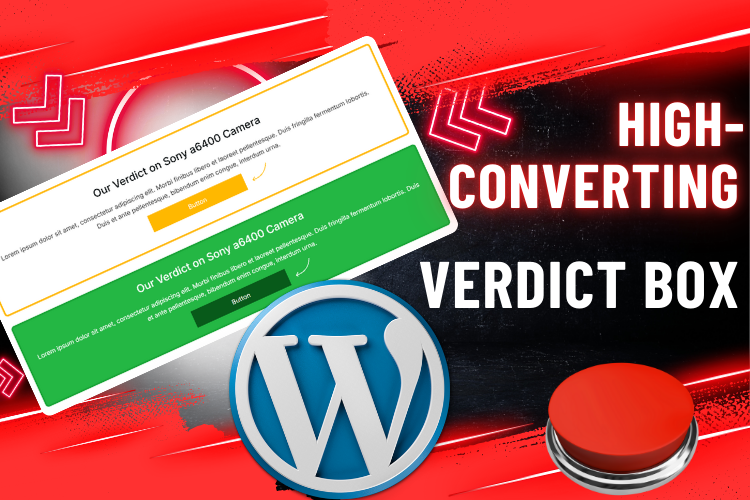
Affiliate marketing is one of the best ways to generate passive income, but how you present product reviews on your blog matters! The Affiliate X Plugin is a game-changer, allowing you to add professional-looking verdict boxes effortlessly.

Whether you’re running an affiliate blog, business website, or review site, this plugin makes your posts more engaging, informative, and conversion-friendly.

“Affiliate marketing is not about pushing products, but about building trust with your audience.” – Neil Patel

Ready to take your affiliate marketing to the next level? Let’s dive into how you can create and customize a verdict box with Affiliate X Plugin for maximum impact!

Watch This YouTube Video for a Step-by-Step Guide

  • Watch This YouTube Video for a Step-by-Step Guide
  • What is the Affiliate X Plugin?
    • Key Features of Affiliate X Plugin
  • How to Install & Activate Affiliate X Plugin?
  • Creating a Verdict Box with Affiliate X Plugin
    • Step 1: Open Your Blog Post
    • Step 2: Add a Verdict Block
    • Step 3: Customize Your Verdict Box
  • Advanced Customization Options
    • Change the Layout
    • Modify Colors & Fonts
    • Align Content for Better Aesthetics
  • Why Use Affiliate X Plugin for Your Blog?
  • FAQs About Affiliate X Plugin
  • Final Thoughts: Transform Your Blog with Affiliate X Plugin
    • 🚀 Subscribe to Our YouTube Channel for More Tutorials!
    • 💬 Need Help? Contact Us!

What is the Affiliate X Plugin?

Affiliate X is a WordPress plugin designed to help bloggers, marketers, and online businesses create engaging verdict boxes, pros and cons lists, and comparison tables to enhance product reviews. Instead of manually formatting your review sections, this plugin provides ready-made templates that boost engagement and conversions.

Key Features of Affiliate X Plugin

  • Pre-designed Verdict Box Layouts – Save time and effort with stunning designs
  • Customizable Ratings – Showcase your review scores dynamically
  • Pros & Cons Sections – Clearly outline product advantages and drawbacks
  • Easy Integration – Works seamlessly with Gutenberg and Classic Editor
  • Mobile-Responsive – Ensures your verdict box looks great on all devices

With these features, Affiliate X Plugin simplifies the process of creating structured and visually appealing reviews for your audience.

How to Install & Activate Affiliate X Plugin?

Setting up Affiliate X Plugin is super easy!

Follow these quick steps to get started:

  1. Go to WordPress Dashboard
    Navigate to your WordPress admin panel.
  2. Visit the Plugin Section
    Click on Plugins > Add New from the left sidebar.
  3. Search for “Affiliate X”
    Type “Affiliate X” in the search bar and press enter.
  4. Install and Activate the Plugin
    Once you find it, click Install Now and then Activate to start using it.

Once activated, the plugin will be ready to create stunning verdict boxes!

Creating a Verdict Box with Affiliate X Plugin

Once the plugin is installed, it’s time to add a verdict box to your posts! Follow these simple steps:

Step 1: Open Your Blog Post

Go to Posts > All Posts and open the blog post where you want to add the verdict box.

Step 2: Add a Verdict Block

  • Click on the plus (+) icon to add a new block.
  • Search for “Verdict” and select Affiliate X Verdict from the block list.

Step 3: Customize Your Verdict Box

After inserting the verdict box, you will see a default layout. You can customize it as follows:

  • Edit Title: Click on the title to change it to your product name.
  • Add Ratings: Adjust the star ratings to reflect the product’s performance.
  • Write a Description: Provide a compelling product summary in the description box.
  • Modify Pros & Cons: List the advantages and disadvantages of the product.

Advanced Customization Options

Want to personalize the verdict box further?

Here’s what you can do:

Change the Layout

  • Go to the right sidebar and select Layout Settings.
  • Choose between Layout 1 and Layout 2 based on your preference.

Modify Colors & Fonts

  • Adjust title colors, content fonts, and button styles to match your website’s theme.
  • Change the button text (e.g., “Check Price” or “Buy Now”).

Align Content for Better Aesthetics

  • Use alignment settings to center or justify your text.
  • Adjust box shadow and border settings for a professional look.

With these tweaks, you can create a verdict box that looks sleek and converts visitors into buyers!

Why Use Affiliate X Plugin for Your Blog?

The Affiliate X Plugin is an essential tool for affiliate marketers and bloggers looking to increase engagement and revenue.

Here’s why it’s worth using:

✅ Boosts Conversions – Well-structured verdict boxes increase click-through rates (CTR)
✅ Enhances Readability – Users can quickly scan key pros, cons, and ratings
✅ Saves Time – No need for manual formatting or custom CSS
✅ Professional Look – Gives your blog posts a clean and modern appearance

“Success in affiliate marketing depends on delivering value first, and Affiliate X Plugin helps you do just that!”

FAQs About Affiliate X Plugin

A verdict box is a visually appealing review section that highlights a product’s key features, ratings, and pros & cons in an engaging format.

Yes! Affiliate X Plugin is compatible with most WordPress themes, ensuring seamless integration.

Affiliate X Plugin offers a free version with basic features, but you can unlock premium templates and advanced customization with the pro version.

Absolutely! The verdict boxes created with Affiliate X Plugin are fully mobile-responsive.

You can contact the Affiliate X Plugin support team via their official website or WordPress support forum.

Final Thoughts: Transform Your Blog with Affiliate X Plugin

The Affiliate X Plugin is the ultimate tool for creating engaging verdict boxes that enhance readability, boost conversions, and improve the user experience. Whether you’re reviewing tech gadgets, software, or affiliate products, this plugin streamlines the process, ensuring professional-quality content in minutes.

👉 Want to see how it works? Watch the embedded video above for a step-by-step tutorial!

🚀 Subscribe to Our YouTube Channel for More Tutorials!

Click Here to Subscribe

💬 Need Help? Contact Us!

Get in Touch Here

  • Affiliate Marketing
  • Affiliate X Plugin
  • Review Box
  • Verdict Box
  • WordPress Plugin
Share
Prev Post Next Post

Recent Posts

Before vs. After: How Blog Post Formatting Transforms the Same Content
May 19, 2025
Blog Post Formatting Services
Weekly Blog Post Formatting Services: Save Time and Improve Quality
May 4, 2025
how to format a blog post
How to Format a Blog Post Like a Pro: The Ultimate Guide to Presenting Your Blog Beautifully
Apr 9, 2025

Tags

  • Adding Featured Images
  • Add Media and Text in WordPress
  • Add Text Over Images in WordPress
  • AffiliateX Plugin
  • Affiliate X Plugin
  • Blog Engagement
  • blog formatting
  • Blog Formatting Tips
  • Blogging Tips
  • Blog Post Formatting
  • Blog Post Optimization
  • Business
  • classic editor
  • Combine Media and Text in WordPress
  • Digital
  • Funds
  • Gutenberg editor
  • Gutenberg Editor Tips
  • Install Jetpack Plugin
  • Jetpack Features Guide
  • Kadence Block
  • Kadence Blocks
  • Leadership
  • SEO Optimization
  • Tech
  • Text Overlay in WordPress
  • WordPress Blog Optimization
  • WordPress Blog Post Formatting
  • WordPress Blog Tips
  • WordPress Content Management
  • WordPress Customization
  • WordPress Design Without Photoshop
  • WordPress Editing Tips
  • WordPress formatting
  • WordPress Image Upload
  • WordPress Media and Text Block
  • WordPress Plugin
  • WordPress Plugins
  • WordPress SEO
  • WordPress Text Formatting
  • WordPress Tips
  • WordPress Tutorial
  • WordPress tutorials
  • WordPress user roles
  • WordPress without Plugins
PostUploader.com

Post Uploader LLC

75 E 3rd St Sheridan, WY 82801, USA info@postuploader.com +1 (307) 310-2432

Secure Payments

Payments on this website are processed securely through Stripe.

We accept major credit and debit cards, including Visa, MasterCard, American Express, and Discover.

Additional payment methods such as Google Pay, Cash App Pay, Amazon Pay, and the express checkout option “Link” may also be available depending on your device and location.

About

  • About Us
  • Recognition & Trust
  • Leadership Team
  • Blog

Our Services

  • Blog Formatting & Publishing
  • eCommerce Product Listing
  • Get a Website
  • Website Content Population
  • AI Workflow Automation
  • Virtual Assistant Support

Our Clients

  • Small & Growing Businesses
  • Digital Marketing Agencies
  • IT & Technology Businesses
  • eCommerce Businesses
  • Bloggers & Niche Websites
  • Physiotherapy & Healthcare Websites

Important Links

  • Privacy Policy
  • Terms of Service & Refund Policy
  • Request Consultation
  • FAQ's
  • Careers
  • Contact Us

©2022 - Post Uploader LLC, All Rights Reserved.

PostUploader
Focus on writing while we handle formatting, structure, images, and publishing—everything your blog needs to go live professionally.

Check our pricing below to get started today.
See Pricing Plans

Post Uploader LLC

75 E 3rd St Sheridan, WY 82801, USA info@postuploader.com +1 (307) 310-2432
Live Chat
1
Scan the code
Message Us on WhatsApp
Hello,
Welcome to PostUploader.com
May I help with your Blog Post Formatting and Publishing?
Start a Chat

